
Manage candidates in a kanban-style pipeline with applied, screening, interview, offer, hired, rejected and withdrawn stages, including required rejection reasons and headcount-aware closure.
Manage candidates in a kanban-style pipeline with applied, screening, interview, offer, hired, rejected and withdrawn stages, including required rejection reasons and headcount-aware closure.
The board shows five active columns from applied to hired, while rejected and withdrawn applications are tracked off-board.
Scheduling interviews, extending offers and converting candidates advance the stage automatically — auto-advance never moves a candidate backwards and pauses at interview and offer.
Rejection requires a reason and headcount closure stops extra manual entries once the opening is filled.
The Candidate Pipeline page helps HR move applications through applied, screening, interview, offer, hired, rejected and withdrawn stages with clear candidate status.
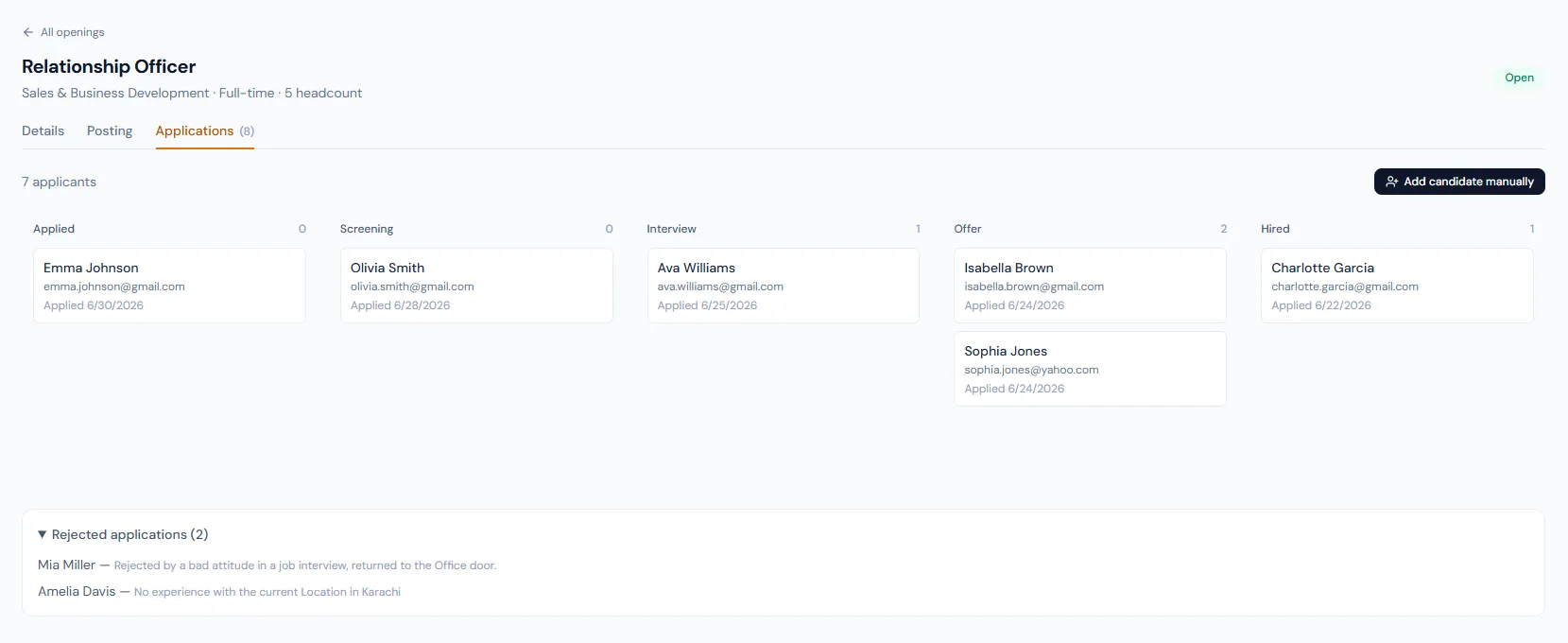
Manage candidates in a kanban-style pipeline with applied, screening, interview, offer, hired, rejected and withdrawn stages, including required rejection reasons and headcount-aware closure.
Every view stays structured and reviewable — nothing hides behind a tab.
Applied, screening, interview, offer and hired represent the normal hiring path.
Rejected and withdrawn states separate HR decisions from candidate decisions.
Scheduling an interview moves candidates into interview, offers move to offer, conversion moves to hired.
When hired count reaches opening headcount, the opening can become filled.
HR can review applications by stage across the five active columns.
The stage vocabulary is documented and consistent.
Key actions update the stage without manual double entry, and never walk a candidate backwards.
Rejected applications require a reason and automatically send the rejection email.
Withdrawn is distinct from HR rejection and is set automatically when a candidate declines an offer publicly.
The pipeline understands when the role is filled.
Applied, screening, interview, offer, hired, rejected and withdrawn.
Moving from interview to offer intentionally goes through the Extend Offer step.
The opening can auto-transition to filled.
Map your current workflow to the right HRM setup, permissions and rollout plan.