
Shift timing
Start and end times define the expected workday.
Configure employee shifts with work timing, expected attendance windows and default rule context for lateness, overtime, leave inheritance and daily attendance calculations.
Shift start and end times define the attendance day.
Configure employee shifts with work timing, expected attendance windows and default rule context for lateness, overtime, leave inheritance and daily attendance calculations.
Start and end times define the expected workday.
Employees inherit attendance behavior from assigned shifts.
Late, half-day, overtime and leave defaults depend on shift configuration.
The Shifts page from HRM defines work timing, employee assignments and rule context so attendance, leave and payroll calculations stay consistent.
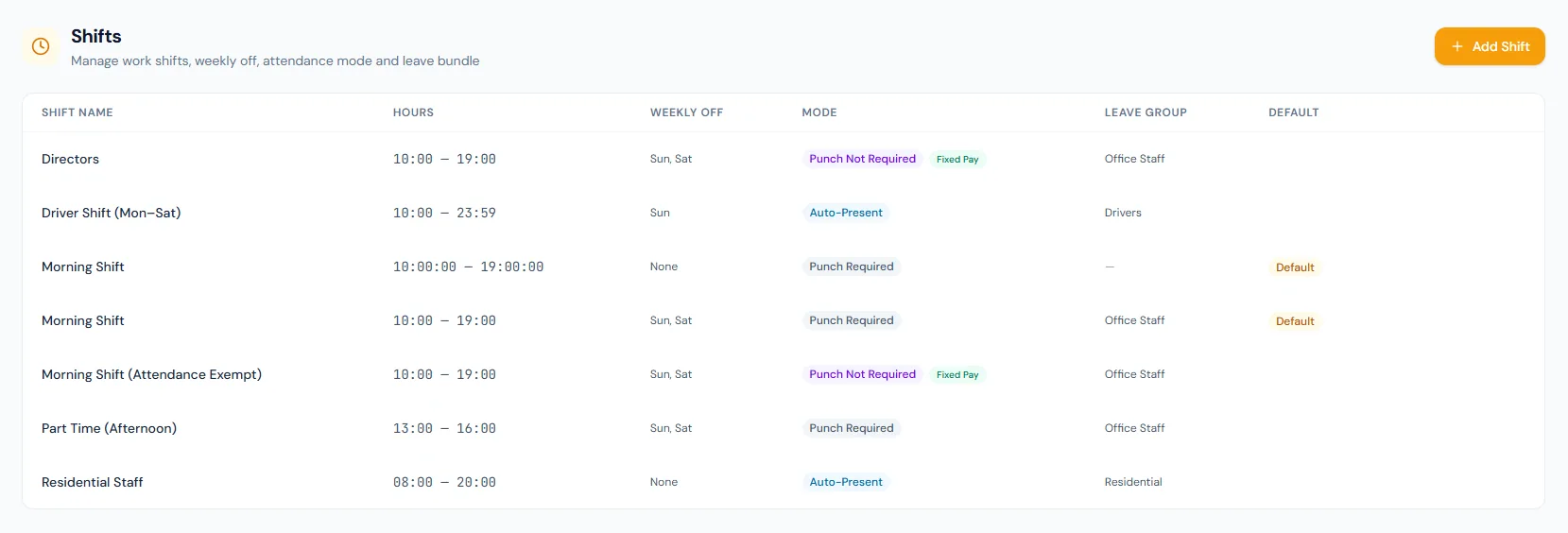
Define when employees are expected to work, including per-shift weekly-off days.
Each shift chooses punch-required, automatic nightly presence, or punch-not-required for exempt roles.
A shift can declare that attendance does not affect salary — right for fixed retainers.
Employee shift changes are effective-dated, and past days re-grade under the shift that applied then.
Lateness depends on shift start and grace.
Schedules keep daily attendance rules predictable.
Configure employee shifts with work timing, expected attendance windows and default rule context for lateness, overtime, leave inheritance and daily attendance calculations.
Every view stays structured and reviewable — nothing hides behind a tab.
Shift start and end times define the attendance day.
Employees are attached to the correct shift.
Late and overtime settings use shift timing as the baseline.
Each shift carries a default leave group, used whenever the employee has no direct assignment of their own.
They provide the timing baseline for attendance rules.
Yes. Employee attendance uses assigned shift context.
They can provide default context for leave and attendance behavior.
Map your current workflow to the right HRM setup, permissions and rollout plan.