
Maintain employee leave balances with allocated, used and remaining days so HR and employees can understand leave availability before requests and settlements.
Balances
Choose a view to see how this module keeps daily HR work structured and reviewable.
Policy rules assign leave to employees.
Values remain traceable in HRM.The Leave Balances page from HRM keeps allocated, used and remaining leave visible so requests, approvals and final settlement checks use accurate entitlement data.
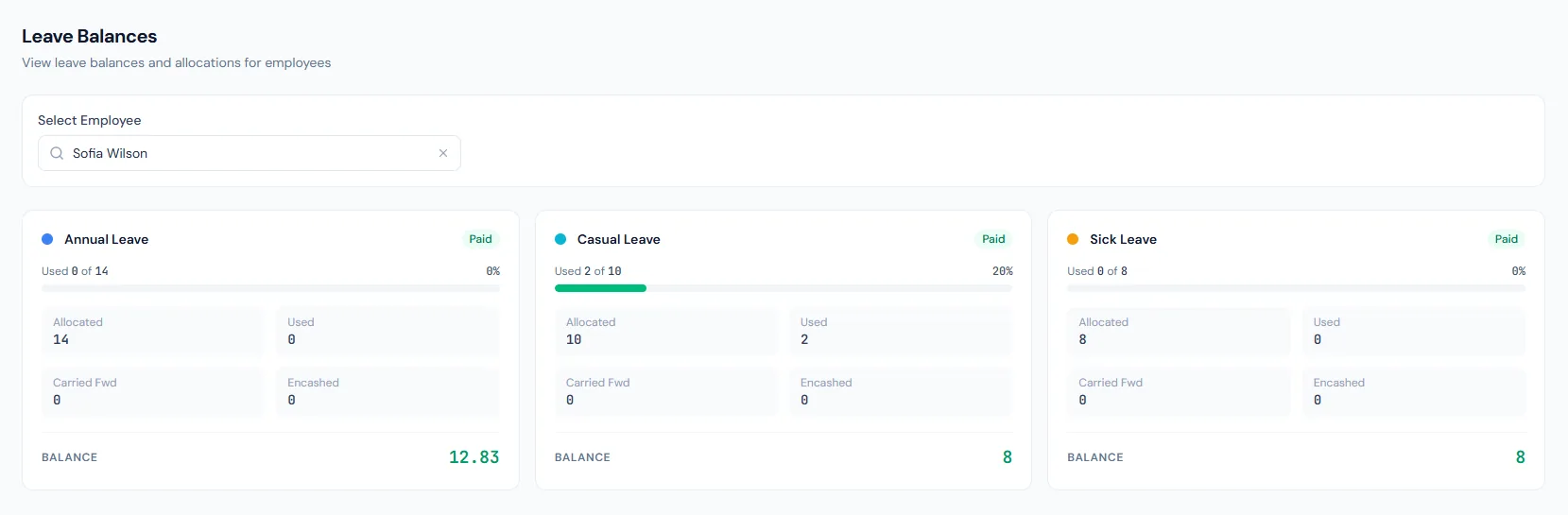
Maintain employee leave balances with allocated, used and remaining days so HR and employees can understand leave availability before requests and settlements.
Employees receive leave according to policy.
Approved leave reduces the available balance.
HR and employees can see what is still available.
Balances read as accrued plus carried forward, minus used, minus encashed.
Unused leave can roll into the next year up to a policy cap.
Approved leave reduces balances.
Monthly-accrual balances grow from the later of joining date or fiscal-year start, visible as they build.
Unused eligible leave can support final settlement.
Balance changes remain traceable.
Maintain employee leave balances with allocated, used and remaining days so HR and employees can understand leave availability before requests and settlements.
Shared context keeps this workflow aligned with leave management records.
ConnectedShared context keeps this workflow aligned with leave policies records.
ConnectedShared context keeps this workflow aligned with employees records.
ConnectedShared context keeps this workflow aligned with offboarding records.
ConnectedShared context keeps this workflow aligned with reports records.
ConnectedAccrued, carried-forward, used and encashed leave, with the remainder always visible.
After leave is approved.
Yes. Eligible unused leave can be used in final settlement.
Map your current workflow to the right HRM setup, permissions and rollout plan.