
+92 (3) 111 104 222 [email protected] 24/7
HRM features / Biometric Devices Device attendance

Sync biometric logs into HRM attendance.

Connect biometric attendance inputs to employee time records so device-backed punch logs support daily attendance, lateness, overtime and payroll review.
Signup Free
Device logs Employee mapping Attendance sync
Biometric Devices workspaceLive
Devices

Biometric Devices

into HRM attendance.Connect biometric attendance inputs to employee time records so device-backed punch logs support daily attendance, lateness, overtime and payroll review.
Ready
SyncLogs
MapEmployees
AuditReady
Workflow snapshotView all

01Register employeeBiometric Devices process stepActive

02Map device userBiometric Devices process stepActive

03Sync punchesBiometric Devices process stepActive

Built aroundDevice logsEmployee mappingAttendance sync
LIVE HRM SCREEN

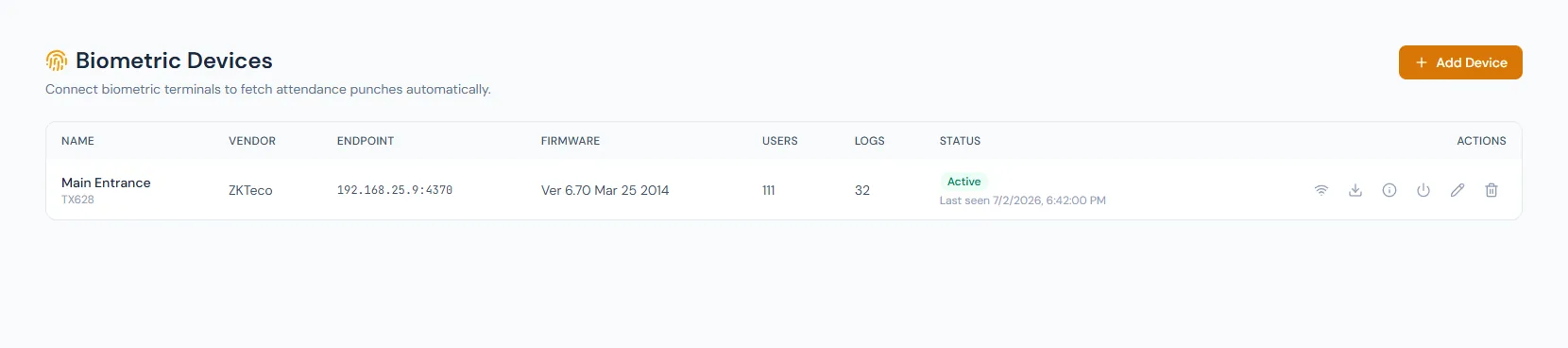
Biometric Devices screen with attendance device sync.

The Biometric Devices page from HRM connects device punch logs to employee attendance records so time tracking, exceptions and payroll review have a stronger source of truth.

Biometric Devices page showing device-backed attendance logs and employee mapping.
THE FOUNDATION

Biometric Devices workflows that stay connected.

Connect biometric attendance inputs to employee time records so device-backed punch logs support daily attendance, lateness, overtime and payroll review.

01

Employee mapping

Device users must map to HRM employee records.

02

Log sync

Biometric punch logs become attendance events.

03

Audit trail

Device-backed records reduce manual attendance disputes.

WORKFLOW LIFECYCLE

Biometric Devices work stays structured from setup to review.

Connect biometric attendance inputs to employee time records so device-backed punch logs support daily attendance, lateness, overtime and payroll review.

  • Register employee
  • Map device user
  • Sync punches
  • Apply shift rules
01
Register employeeBiometric Devices
Ready
02
Map device userBiometric Devices
Ready
03
Sync punchesBiometric Devices
Ready
04
Apply shift rulesBiometric Devices
Ready
05
Review attendanceBiometric Devices
Done
CONTROL SURFACE

Biometric Devices controls keep records clean and traceable.

Choose a view to see how this module keeps daily HR work structured and reviewable.

Device user match

Mapping

Employee records are connected to biometric identities.

Values remain traceable in HRM.
Mapping detailSynced
BUILT FOR CONTROL

Details that make biometric devices dependable.

Biometric punch source

Attendance can be backed by device events.

Employee-device mapping

Device users connect to HRM employees.

Sync workflow

Logs can be imported into attendance.

Exception handling

Unmatched or missing logs can be reviewed.

Audit support

Device-backed records improve traceability.

Payroll readiness

Synced logs support downstream time calculations.

CONNECTED BY DESIGN

Biometric Devices works with the rest of HRM.

Attendance Tracking

Shared context keeps this workflow aligned with attendance tracking records.

Connected

Clock In / Clock Out

Shared context keeps this workflow aligned with clock in / clock out records.

Connected

Employees

Shared context keeps this workflow aligned with employees records.

Connected

Shifts

Shared context keeps this workflow aligned with shifts records.

Connected

Payroll

Shared context keeps this workflow aligned with payroll records.

Connected
COMMON QUESTIONS

What HR teams usually ask about biometric devices.

Punch events that can feed attendance records.

Yes. Device identities must connect to HRM employees.

Yes. Synced attendance can feed payroll rules.

Operentra HRM / Biometric Devices

See how biometric devices fits your HR operation.

Map your current workflow to the right HRM setup, permissions and rollout plan.