
+92 (3) 111 104 222 [email protected] 24/7
HRM features / Attendance View Employee time history

Show employees their attendance record clearly.

Give employees a monthly attendance view with clock status, present or absent days, late marks, overtime context and links back to leave and holiday records.
Signup Free
Monthly view Own attendance Time exceptions
Attendance View workspaceLive
Time view

Attendance View

their attendance record clearly.Give employees a monthly attendance view with clock status, present or absent days, late marks, overtime context and links back to leave and holiday records.
Ready
30Day calendar
OwnMonthly API
LateVisible
Workflow snapshotView all

01Choose monthAttendance View process stepActive

02Review daily statusAttendance View process stepActive

03Check exceptionsAttendance View process stepActive

Built aroundMonthly viewOwn attendanceTime exceptions
LIVE HRM SCREEN

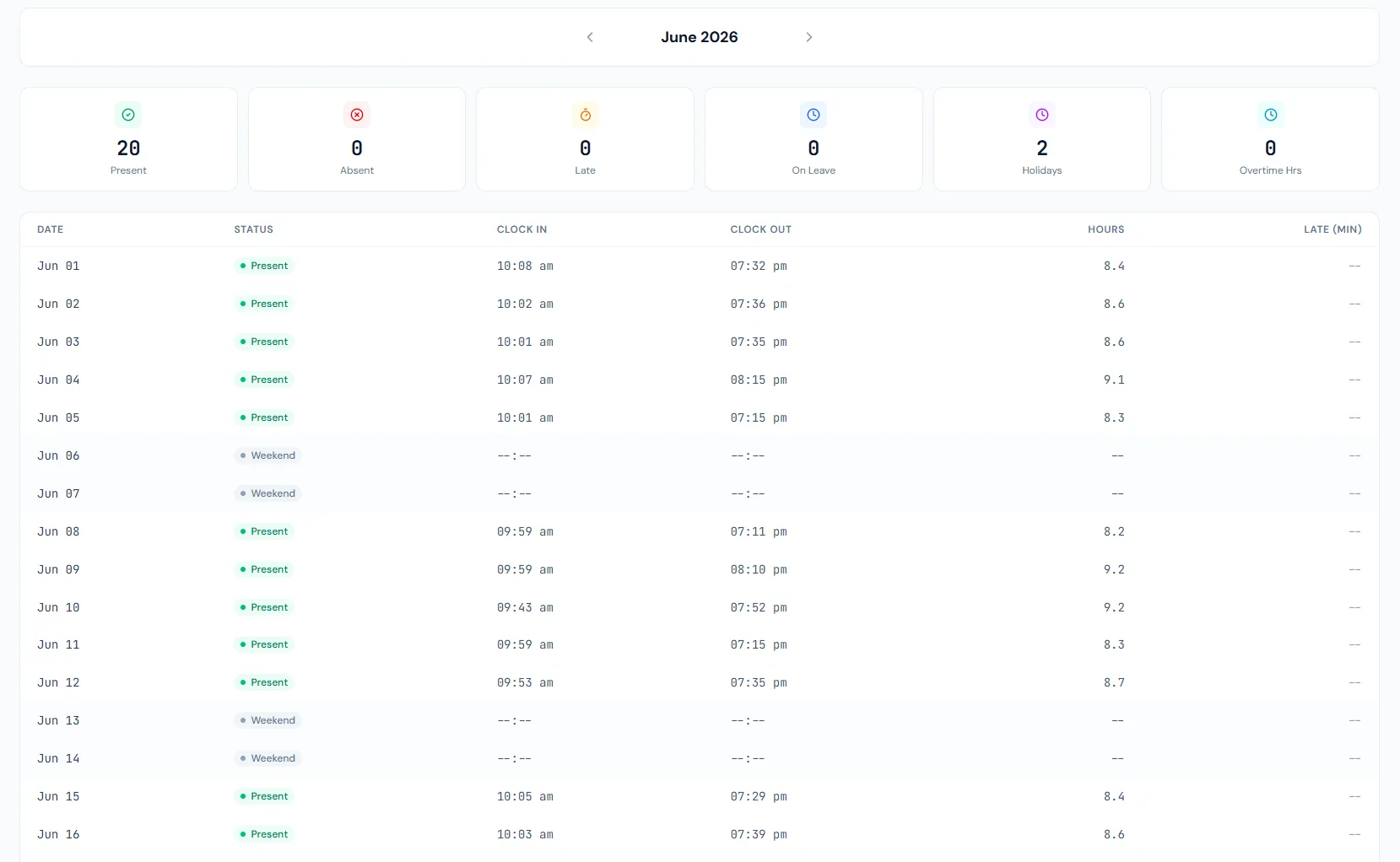
Attendance View screen with monthly employee time history.

The Attendance View page lets employees review their monthly attendance, clock records, late marks, overtime and leave context from the self-service portal.

Attendance View page showing employee monthly attendance, clock status and time exceptions.
THE FOUNDATION

Attendance View workflows that stay connected.

Give employees a monthly attendance view with clock status, present or absent days, late marks, overtime context and links back to leave and holiday records.

01

Monthly attendance

Employees can review their own month of attendance records and daily status.

02

Exception context

Late, absent, overtime and missing time signals can be highlighted before payroll review.

03

Policy context

Leave and holidays explain why a day is not a normal workday.

WORKFLOW LIFECYCLE

Attendance View work stays structured from setup to review.

Give employees a monthly attendance view with clock status, present or absent days, late marks, overtime context and links back to leave and holiday records.

  • Choose month
  • Review daily status
  • Check exceptions
  • Compare leave
01
Choose monthAttendance View
Ready
02
Review daily statusAttendance View
Ready
03
Check exceptionsAttendance View
Ready
04
Compare leaveAttendance View
Ready
05
Ask HR if neededAttendance View
Done
CONTROL SURFACE

Attendance View controls keep records clean and traceable.

Choose a view to see how this module keeps daily HR work structured and reviewable.

Monthly record

Calendar

A calendar or table view keeps daily attendance easy to scan.

Values remain traceable in HRM.
Calendar detailSynced
BUILT FOR CONTROL

Details that make attendance view dependable.

Own attendance access

Employees can see their personal attendance history.

Month selection

A monthly view keeps the record easy to review.

Clock event review

Punch times can be displayed where available.

Exception visibility

Late, absent, overtime and missing-punch issues stand out.

Leave context

Approved leave explains absence days.

Payroll readiness

Employees can raise issues before salary processing.

CONNECTED BY DESIGN

Attendance View works with the rest of HRM.

Employee Portal

Shared context keeps this workflow aligned with employee portal records.

Connected

Portal Dashboard

Shared context keeps this workflow aligned with portal dashboard records.

Connected

Leave Requests

Shared context keeps this workflow aligned with leave requests records.

Connected

Attendance Tracking

Shared context keeps this workflow aligned with attendance tracking records.

Connected

Biometric Devices

Shared context keeps this workflow aligned with biometric devices records.

Connected
COMMON QUESTIONS

What HR teams usually ask about attendance view.

No. Portal attendance is scoped to the signed-in employee.

Yes. Late and overtime context can be highlighted.

Yes. Leave and holidays provide context for non-working days.

Operentra HRM / Attendance View

See how attendance view fits your HR operation.

Map your current workflow to the right HRM setup, permissions and rollout plan.