
Create official HR letters from ready-made templates, employee data and company branding, then preview, render, download, email and audit every issued document.
01Select employeeHR Letters process stepActive
02Choose templateHR Letters process stepActive
03Preview letterHR Letters process stepActive
The core HR correspondence set is ready out of the box.
Each letter type ships with a professional default template.
Employees request letters from the portal — duplicates are guarded, HR is notified, rejections carry a reason, and issuing from a request emails the employee automatically.
The issue form prefills the employee's current salary for salary-bearing letters.
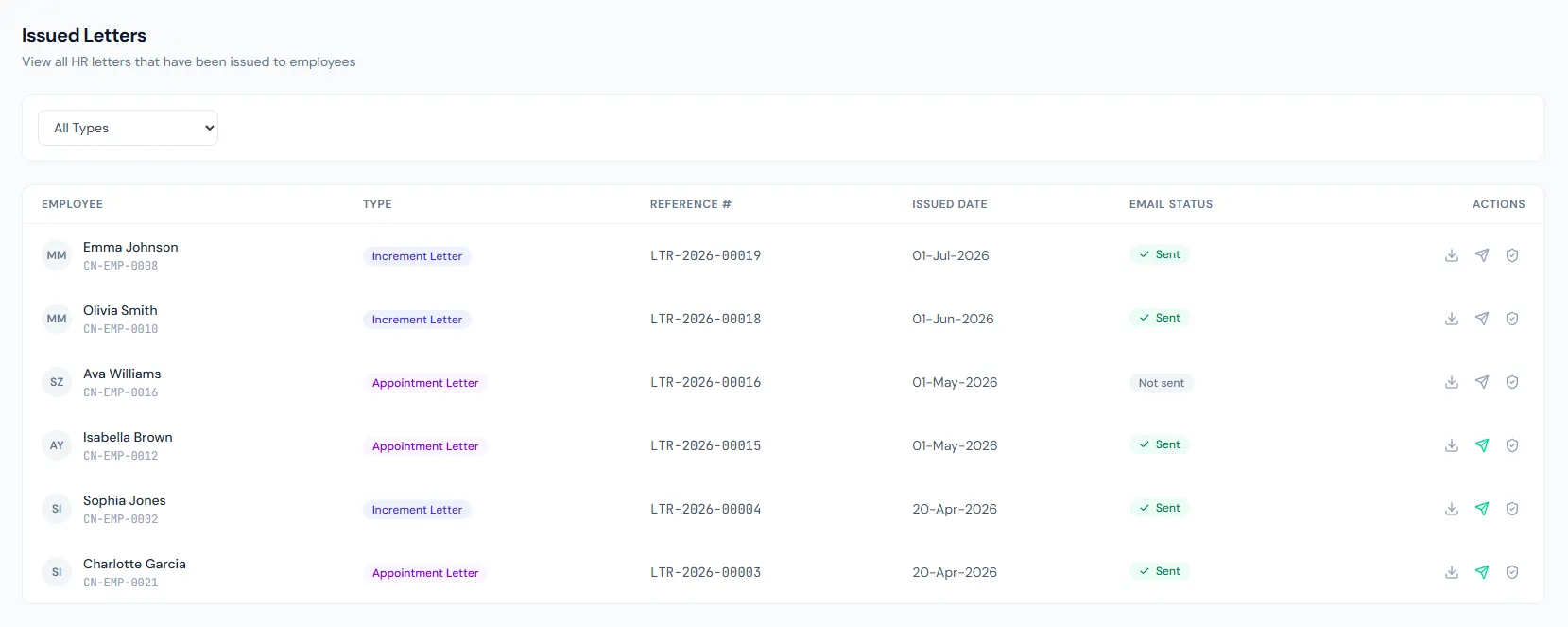
Issued letters can be downloaded, printed or emailed as PDF attachments, with the document fingerprint recorded.
Issued letters remain connected to the employee record and portal.
The HR Letters page from HRM keeps reusable templates, previews, PDF generation and issued correspondence history in one auditable workflow.
Create official HR letters from ready-made templates, employee data and company branding, then preview, render, download, email and audit every issued document.
Create official HR letters from ready-made templates, employee data and company branding, then preview, render, download, email and audit every issued document.
Offer, appointment, salary, warning, termination, promotion, increment, transfer, experience and custom letters are covered.
Company and employee data populate standardized content with fewer manual edits.
Issued letters are logged with metadata and email status, and the PDF renders fresh on every download.
Every view stays structured and reviewable — nothing hides behind a tab.
Ready-made templates cover routine employment correspondence.
HR can preview rendered content before final PDF generation.
Promotions, increments, transfers, separations and contracts can auto-create letters.
Every issued letter mints a verification token, carries an injected QR and can be checked publicly.
Experience, offer, appointment, salary certificate, warning, termination, promotion, increment, transfer and custom letters.
Auto-issued letters are created for review; HR sends email when ready.
Issued letters can be available to employees through self-service history.
Map your current workflow to the right HRM setup, permissions and rollout plan.