
+92 (3) 111 104 222 [email protected] 24/7
HRM features / Bank Accounts Payroll banking

Store company bank accounts for payroll and payments.

Manage company bank accounts with bank name, branch/location, account title, account number, IBAN and primary or secondary account type.

Signup Free
Primary account IBAN details Payroll-ready
Bank Accounts workspaceLive
Bank setup

Bank Accounts

for payroll and payments.Manage company bank accounts with bank name, branch/location, account title, account number, IBAN and primary or secondary account type.
Ready
03Accounts
01Primary
IBANTracked
Workflow snapshotView all

01Add accountBank Accounts process stepActive

02Enter titleBank Accounts process stepActive

03Add IBANBank Accounts process stepActive

Built aroundPrimary accountIBAN detailsPayroll-ready
LIVE HRM SCREEN

Bank Accounts screen with primary and secondary payroll account records.

The Bank Accounts page from HRM stores company payment accounts and highlights the primary payroll bank account.
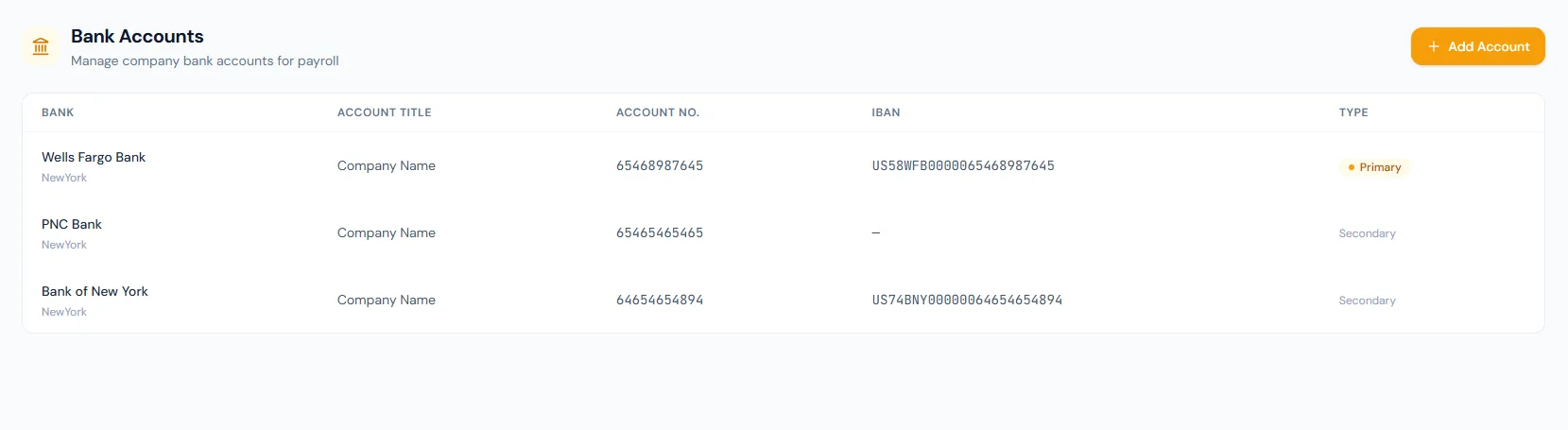
Bank Accounts page showing bank, account title, account number, IBAN and type columns.
THE FOUNDATION

Bank Accounts workflows that stay connected.

Manage company bank accounts with bank name, branch/location, account title, account number, IBAN and primary or secondary account type.

01

Bank record

Keep bank names and locations such as Standard Chartered Bank, Faysal Bank and SCB branch context.

02

Account details

Store account title, account number and IBAN where available.

03

Account type

Mark the primary payroll account and keep secondary accounts visible.

WORKFLOW LIFECYCLE

Bank Accounts work stays structured from setup to review.

Manage company bank accounts with bank name, branch/location, account title, account number, IBAN and primary or secondary account type.

  • Add account
  • Enter title
  • Add IBAN
  • Mark type
01
Add accountBank Accounts
Ready
02
Enter titleBank Accounts
Ready
03
Add IBANBank Accounts
Ready
04
Mark typeBank Accounts
Ready
05
Use for payrollBank Accounts
Done
CONTROL SURFACE

Bank Accounts controls keep records clean and traceable.

Choose a view to see how this module keeps daily HR work structured and reviewable.

Financial institution

Bank

Bank and branch/location context stay visible in the list.

Values remain traceable in HRM.
Bank detailSynced
BUILT FOR CONTROL

Details that make bank accounts dependable.

Bank account table

Bank, account title, account number, IBAN and type are shown together.

Primary account badge

The main payroll account is highlighted.

Secondary accounts

Additional accounts can stay available without becoming the default.

Add account action

Admins can add payment accounts as needed.

Payroll connection

Bank data supports salary disbursement and finance setup.

Clean detail layout

Long IBAN and account numbers are easy to scan in columns.

CONNECTED BY DESIGN

Bank Accounts works with the rest of HRM.

Payroll

Shared context keeps this workflow aligned with payroll records.

Connected

Salary Slips

Shared context keeps this workflow aligned with salary slips records.

Connected

Fiscal Years

Shared context keeps this workflow aligned with fiscal years records.

Connected

Reports

Shared context keeps this workflow aligned with reports records.

Connected

Company Profile

Shared context keeps this workflow aligned with company profile records.

Connected
COMMON QUESTIONS

What HR teams usually ask about bank accounts.

Bank, account title, account number, IBAN and type.

Yes. The screen shows a Primary badge.

They support payroll disbursement and finance record consistency.

Operentra HRM / Bank Accounts

See how bank accounts fits your HR operation.

Map your current workflow to the right HRM setup, permissions and rollout plan.