
+92 (3) 111 104 222 [email protected] 24/7
HRM features / My Assets Issued asset view

Show employees their assigned company assets.

Let employees review active and historical company-issued assets such as laptops, phones, SIMs, badges and accessories from the self-service portal.

Signup Free
Active assignments History Own assets
My Assets workspaceLive
Asset view

My Assets

their assigned company assets.Let employees review active and historical company-issued assets such as laptops, phones, SIMs, badges and accessories from the self-service portal.
Ready
ActiveIssued items
HistoryReturned items
OwnScope
Workflow snapshotView all

01Asset issuedMy Assets process stepActive

02Employee views itemMy Assets process stepActive

03Uses assetMy Assets process stepActive

Built aroundActive assignmentsHistoryOwn assets
LIVE HRM SCREEN

My Assets screen with employee asset assignments.

The My Assets page lets employees review active and historical company-issued assets, including item details, assignment dates and custody context.
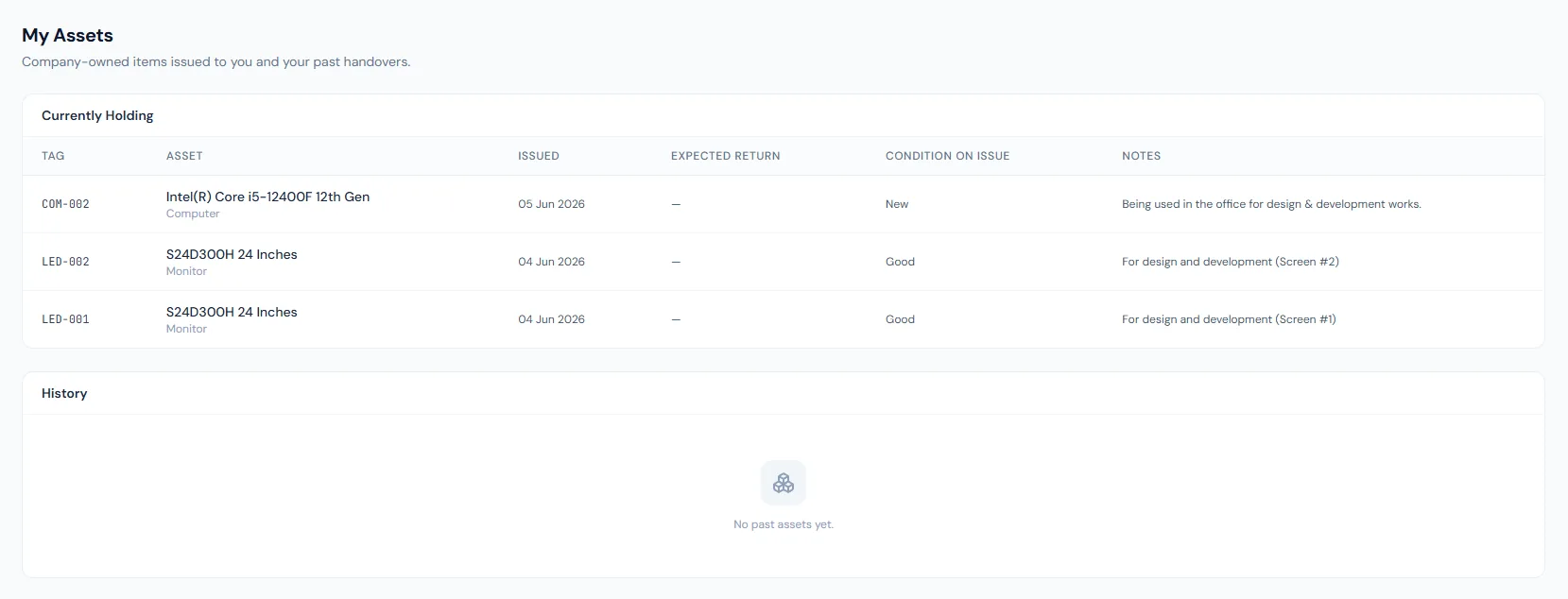
My Assets page showing employee assigned company assets, asset details and assignment history.
THE FOUNDATION

My Assets workflows that stay connected.

Let employees review active and historical company-issued assets such as laptops, phones, SIMs, badges and accessories from the self-service portal.

01

Issued asset list

Employees can see what company-owned items are currently assigned to them.

02

Assignment history

Returned or previously issued assets remain visible for context.

03

Admin-driven return

The portal is a visibility layer while issue and return actions remain controlled by HR or asset admins.

WORKFLOW LIFECYCLE

My Assets work stays structured from setup to review.

Let employees review active and historical company-issued assets such as laptops, phones, SIMs, badges and accessories from the self-service portal.

  • Asset issued
  • Employee views item
  • Uses asset
  • Admin records return
01
Asset issuedMy Assets
Ready
02
Employee views itemMy Assets
Ready
03
Uses assetMy Assets
Ready
04
Admin records returnMy Assets
Ready
05
History retainedMy Assets
Done
CONTROL SURFACE

My Assets controls keep records clean and traceable.

Choose a view to see how this module keeps daily HR work structured and reviewable.

Current holder view

Active

Employees see active assets currently assigned to them.

Values remain traceable in HRM.
Active detailSynced
BUILT FOR CONTROL

Details that make my assets dependable.

Active asset visibility

Employees know what assets HRM records under their custody.

Assignment history

Past issue and return records remain available.

Asset detail

Tags, categories and condition help identify each item.

Offboarding fit

Current assets can support clearance checklists.

Employee privacy

Only the employee's own assets are shown.

Admin custody control

Issue and return remain governed by asset administrators.

CONNECTED BY DESIGN

My Assets works with the rest of HRM.

Employee Portal

Shared context keeps this workflow aligned with employee portal records.

Connected

Assets Assignment

Shared context keeps this workflow aligned with assets assignment records.

Connected

Offboarding

Shared context keeps this workflow aligned with offboarding records.

Connected

Employee Management

Shared context keeps this workflow aligned with employee management records.

Connected

Reports

Shared context keeps this workflow aligned with reports records.

Connected
COMMON QUESTIONS

What HR teams usually ask about my assets.

The docs describe employee visibility; return is admin-driven in the current flow.

Company-owned items such as laptops, phones, SIMs, monitors, badges and accessories.

Yes. Active and historical assignments can be returned by the portal endpoint.

Operentra HRM / My Assets

See how my assets fits your HR operation.

Map your current workflow to the right HRM setup, permissions and rollout plan.