
+92 (3) 111 104 222 [email protected] 24/7
HRM features / Loan Reports Loan reporting

Track loan exposure and repayment progress.

Review active loans, repayment schedules and loan disbursement reports so HR and finance can monitor balances, payroll deductions and employee loan history.

Signup Free
Active loans Repayment schedule Disbursement
Loan Reports workspaceLive
Loan reports

Loan Reports

and repayment progress.Review active loans, repayment schedules and loan disbursement reports so HR and finance can monitor balances, payroll deductions and employee loan history.
Ready
3Core views
BalanceTracked
PayrollDeducted
Workflow snapshotView all

01Select loan reportLoan Reports process stepActive

02Apply period/status filtersLoan Reports process stepActive

03Review balancesLoan Reports process stepActive

Built aroundActive loansRepayment scheduleDisbursement
LIVE HRM SCREEN

Loan Reports screen with exposure and repayment reporting.

The Loan Reports page from HRM helps teams review active loan exposure, repayment schedules, disbursement history and payroll-linked deductions from one reporting view.
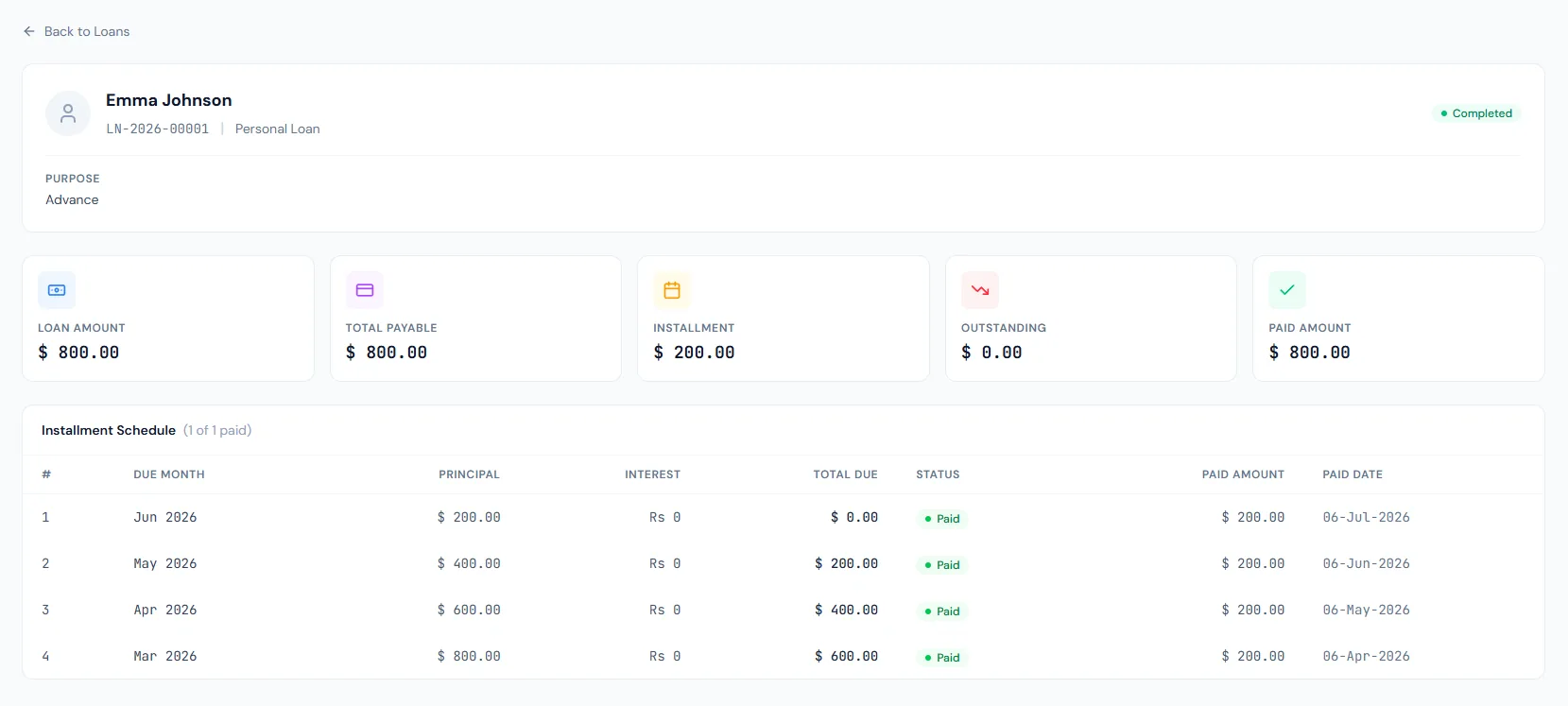
Loan Reports page showing active loans, repayment schedules and loan disbursement reporting.
THE FOUNDATION

Loan Reports workflows that stay connected.

Review active loans, repayment schedules and loan disbursement reports so HR and finance can monitor balances, payroll deductions and employee loan history.

01

Active loans

List loans that still affect employee balances and payroll deductions.

02

Repayment schedules

Show installment timing, paid amounts and remaining balances.

03

Disbursement report

Track issued loan amounts and dates for finance reconciliation.

WORKFLOW LIFECYCLE

Loan Reports work stays structured from setup to review.

Review active loans, repayment schedules and loan disbursement reports so HR and finance can monitor balances, payroll deductions and employee loan history.

  • Select loan report
  • Apply period/status filters
  • Review balances
  • Check repayments
01
Select loan reportLoan Reports
Ready
02
Apply period/status filtersLoan Reports
Ready
03
Review balancesLoan Reports
Ready
04
Check repaymentsLoan Reports
Ready
05
ExportLoan Reports
Done
CONTROL SURFACE

Loan Reports controls keep records clean and traceable.

Choose a view to see how this module keeps daily HR work structured and reviewable.

Open balances

Active

Active loan reports identify employees with outstanding loan exposure.

Values remain traceable in HRM.
Active detailSynced
BUILT FOR CONTROL

Details that make loan reports dependable.

Active loan report

Monitor open employee loans.

Loan repayment schedule

Review planned and completed installments.

Loan disbursement report

Track issued loan amounts.

Payroll deduction visibility

Connect installment reporting to salary processing.

Final settlement support

Outstanding balances can support offboarding settlement review.

Export support

Share loan reports with finance in controlled formats.

CONNECTED BY DESIGN

Loan Reports works with the rest of HRM.

HR Reports

Shared context keeps this workflow aligned with hr reports records.

Connected

Loans

Shared context keeps this workflow aligned with loans records.

Connected

Payroll Reports

Shared context keeps this workflow aligned with payroll reports records.

Connected

Final Settlement

Shared context keeps this workflow aligned with final settlement records.

Connected

Employee Reports

Shared context keeps this workflow aligned with employee reports records.

Connected
COMMON QUESTIONS

What HR teams usually ask about loan reports.

Active Loans, Loan Repayment Schedule and Loan Disbursement.

Yes. Loan installments can be deducted through payroll.

Yes. Outstanding balances matter during final settlement.

Operentra HRM / Loan Reports

See how loan reports fits your HR operation.

Map your current workflow to the right HRM setup, permissions and rollout plan.