
Collect employee daily reports, detect padded or low-effort submissions, notify managers and book missed-report penalties when required reports are not submitted.
Report review
Employees can provide recurring work updates.
Report content is checked for effort and honesty. Verified GitHub and WHMCS activity is supporting evidence only — work the tools cannot see is never held against a report.
Any verdict can be replaced by a manager in one click; points are corrected through a new audit-trailed ledger entry and the original AI verdict is kept.
Turn AI scoring off workspace-wide and reports run on deterministic rules, with no report text sent to any AI provider for scoring.
Employees required to report can be flagged when they miss a working day.
Designations set the daily-report default and individual employees can be exempted — exempt staff are skipped by the penalty sweep.
Submitted or missed reports trigger performance email templates.
A paginated reader with steady summary chips lets managers work through flagged, missed or low-effort reports.
Collect employee daily reports, detect padded or low-effort submissions, notify managers and book missed-report penalties when required reports are not submitted.
Employees submit work summaries that become performance signals.
AI can flag low-effort, duplicated, padded or mismatched reports for review.
A scheduled sweep books penalties after shift end when required reports are missing.
The Daily Reports page helps managers review employee work updates, inspect quality signals, identify missed reports and feed performance evidence into the merit ledger.
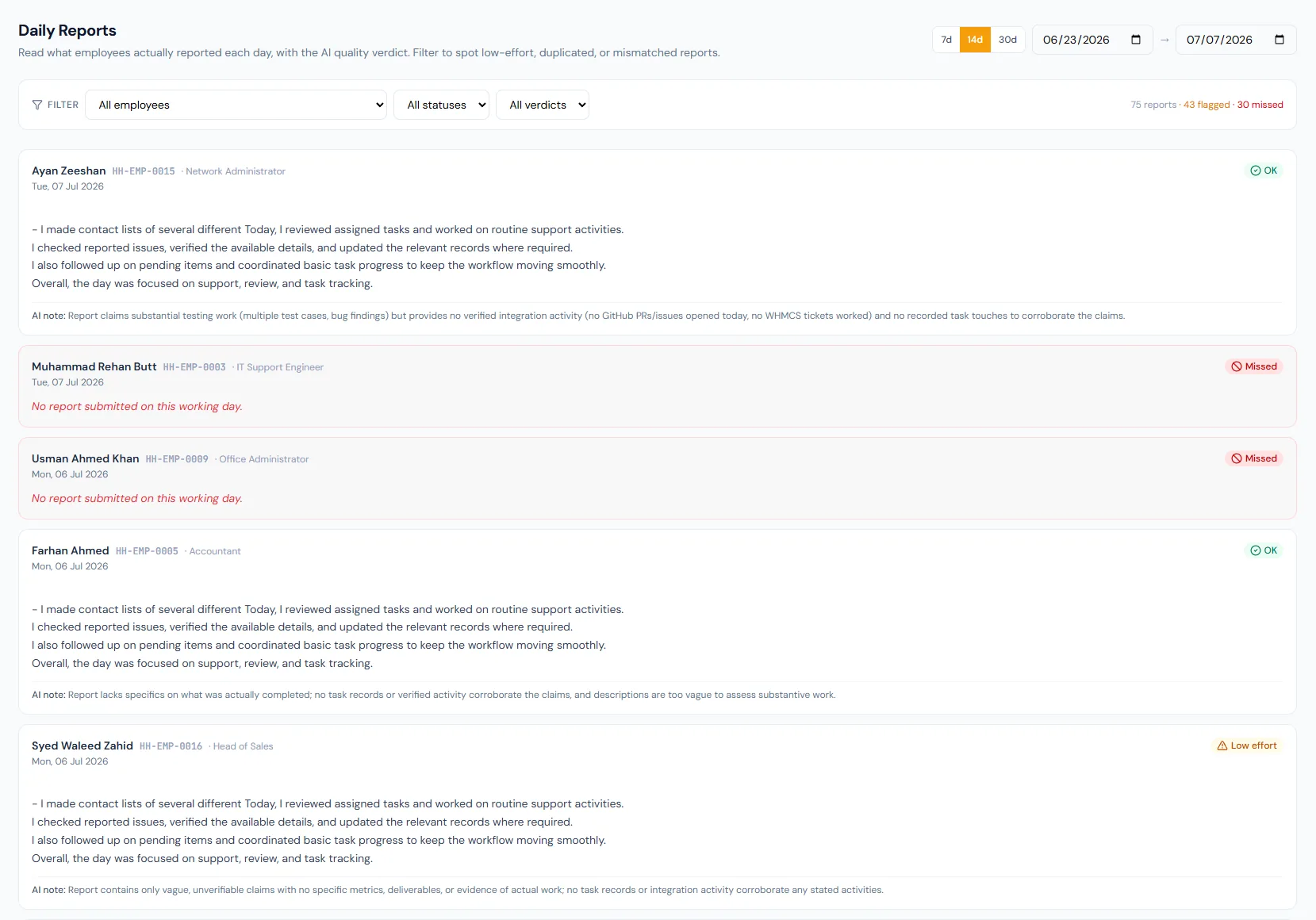
Choose a view to see how this module keeps daily HR work structured and reviewable.
Daily reports describe actual work for a selected date; once submitted, a report is locked and cannot be edited or resubmitted.
Values remain traceable in HRM.A verdict lands within seconds of submission. When it reads a report wrong — and sometimes it will — a manager replaces it, the points correct themselves, and both versions stay on the record.
The original verdict is never deleted — it stays alongside the correction, which is what makes an appraisal conversation defensible.
Two supplier calls to close the Q3 stock order, site walk-through with the new warehouse lead, and rebuilt the delivery roster after the Tuesday absences.
Shared context keeps this workflow aligned with appraisals records.
ConnectedShared context keeps this workflow aligned with performance tracking records.
ConnectedShared context keeps this workflow aligned with merit evidence records.
ConnectedShared context keeps this workflow aligned with payroll records.
ConnectedShared context keeps this workflow aligned with badges & rewards records.
ConnectedYes. Submitted and missed reports can produce merit evidence.
No. AI helps classify reports; salary changes remain approval-driven.
Yes. The scheduled missed-report sweep can book configured penalties.
Map your current workflow to the right HRM setup, permissions and rollout plan.