Create gradePay Grades
Ready
Manage pay grades with minimum and maximum salary ranges so roles, increments and payroll decisions can stay aligned with approved compensation bands.
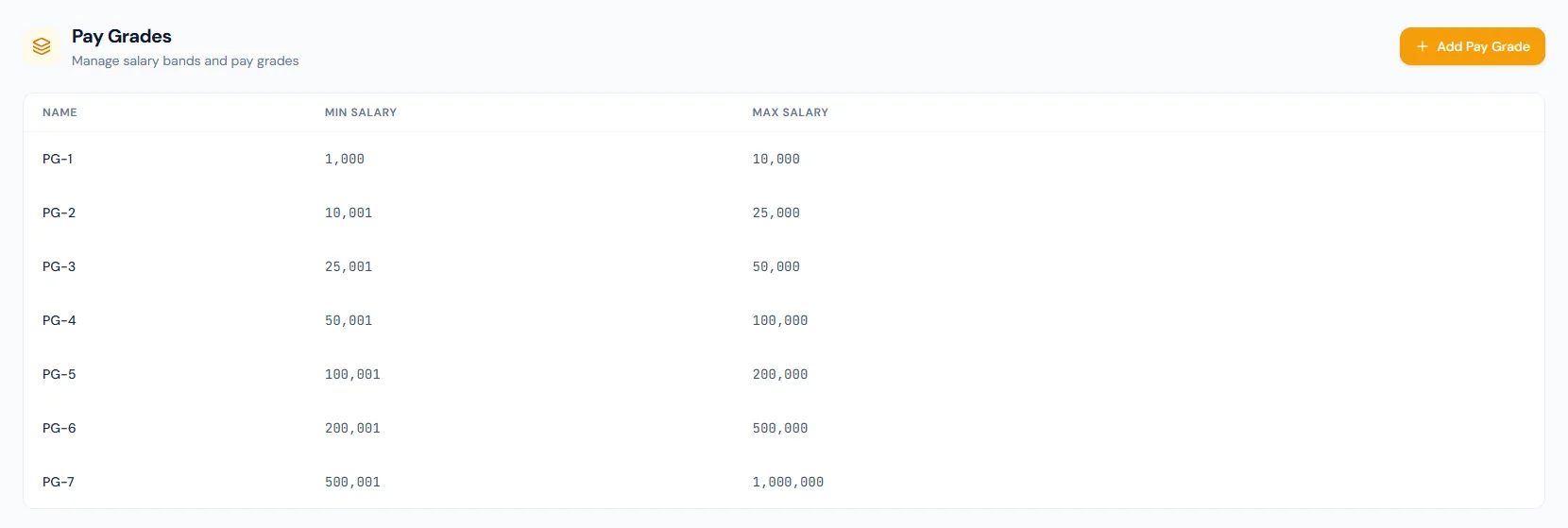
Each pay grade defines a min and max salary range.
Manage pay grades with minimum and maximum salary ranges so roles, increments and payroll decisions can stay aligned with approved compensation bands.
Manage pay grades with minimum and maximum salary ranges so roles, increments and payroll decisions can stay aligned with approved compensation bands.
Use simple pay grade labels such as PG-1 through PG-7 for clear compensation grouping.
Store the lower bound for each grade so payroll and HR have a controlled baseline.
Set the upper bound for each grade to support promotion, increment and offer decisions.
The Pay Grades page from HRM lists compensation ranges from PG-1 through PG-7 for structured salary planning.
Choose a view to see how this module keeps daily HR work structured and reviewable.
Each pay grade defines a min and max salary range.
Values remain traceable in HRM.Admins can scan grade name, minimum salary and maximum salary in one view.
Ranges arrive ready-made in the company currency — PKR, AED, SAR, INR, USD and GBP each have their own presets.
PG-1 through PG-7 come pre-mapped to the built-in designation catalogue.
Bands are governance benchmarks; an individual contract can sit outside its band when the business decides.
Salary bands provide context before payroll values are finalized.
The UI supports adding new pay grades as the structure expands.
Shared context keeps this workflow aligned with designations records.
ConnectedShared context keeps this workflow aligned with employees records.
ConnectedShared context keeps this workflow aligned with payroll records.
ConnectedShared context keeps this workflow aligned with appraisals records.
ConnectedShared context keeps this workflow aligned with reports records.
ConnectedA name, minimum salary and maximum salary.
They keep compensation decisions consistent across roles and payroll planning.
Yes. The page includes an Add Pay Grade action.
Map your current workflow to the right HRM setup, permissions and rollout plan.